You ask your company's new AI chatbot how many vacation days you can carry into next year. It answers instantly and confidently: "10 days." The real answer, buried in an HR policy updated last month, is 5.
The chatbot didn't know your company's policy, so it produced a plausible-sounding guess. This is one of the most common problems with AI assistants, and RAG in AI is one of the most practical ways to fix it.
Retrieval-Augmented Generation (RAG) lets an AI look up relevant information from a trusted source before it answers. Instead of relying only on memory, it checks the facts first.
Key Takeaways
- RAG connects a large language model (LLM) to an external knowledge source so it can retrieve facts before answering.
- It helps reduce LLM hallucinations, keeps answers up to date, and gives AI access to private data without retraining.
- The pipeline has eight steps: ingest, chunk, embed, store, embed the query, retrieve, augment, and generate.
- RAG is usually cheaper and faster to update than fine-tuning, but its answers are only as good as the data and retrieval behind them.
- Tools like LangChain, LlamaIndex, and vector databases such as Chroma or Pinecone make it possible to build a basic RAG app in an afternoon.
What Is RAG in AI? A Simple Definition
Retrieval-augmented generation is a technique that combines two things: a search system that finds relevant information, and a language model that writes the answer. The name describes the process exactly. The system retrieves information, augments (adds to) the prompt with it, and then generates a response.
Think of it as the difference between a closed-book exam and an open-book exam.
- Closed-book (a plain LLM): The student answers from memory. If they studied the wrong edition of the textbook, or never covered the topic, they might confidently write something wrong.
- Open-book (an LLM with RAG): The student flips to the right page, reads the relevant paragraph, and then writes the answer in their own words.
The student is just as smart in both cases. The open book simply gives them the right facts at the right moment.
Why LLMs Need RAG
A large language model (LLM) like the ones behind ChatGPT or Claude learns by reading enormous amounts of text during training. That gives it strong language skills, but also four built-in limitations.
1. Knowledge Cutoff
Every LLM has a knowledge cutoff: the date its training data ends. Anything that happened afterward, such as a new law, a product launch, or last week's policy change, is invisible to the model unless you give it that information.
2. Hallucinations
LLM hallucinations happen when a model generates information that sounds correct but is false. LLMs are built to predict likely-sounding text, not to check facts, so gaps get filled with confident guesses. RAG reduces this by supplying real source material, though it doesn't remove the risk entirely.
3. No Access to Private Data
Public LLMs were never trained on your company's internal wiki, customer contracts, or course notes. Without a way to bring that information in, the model can't answer questions about it.
4. The Cost of Retraining
You could fine-tune a model (train it further on your own data) every time your information changes. In practice, that's slow, expensive, and requires machine learning expertise. With RAG, updating the AI's knowledge can be as simple as adding a new document.
How RAG Works: Step by Step
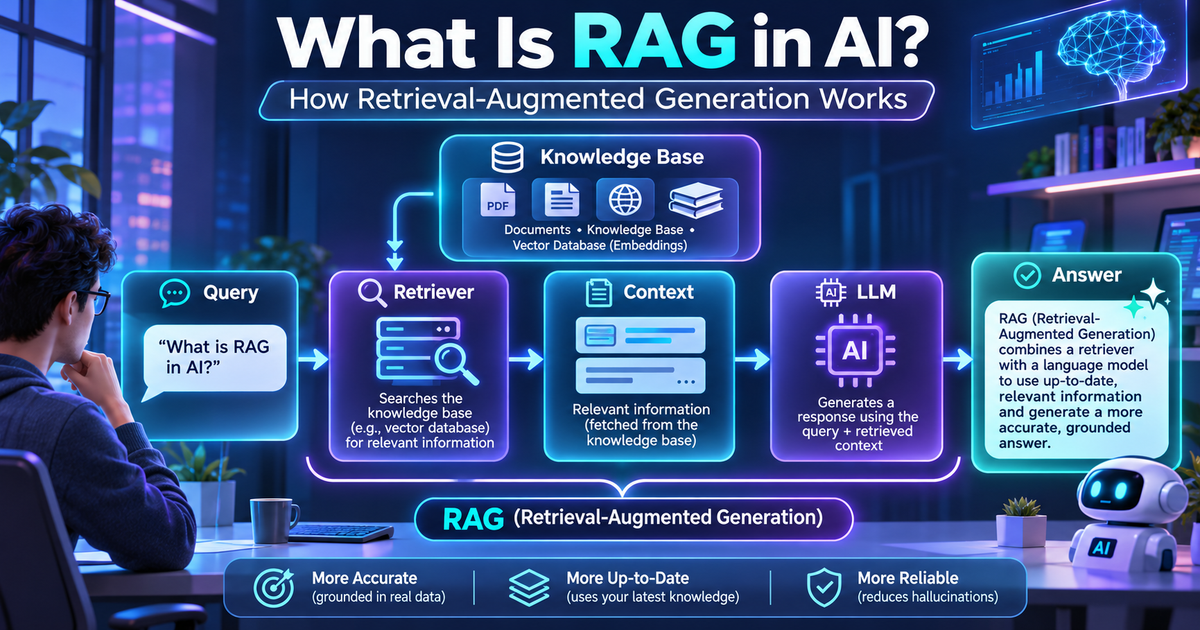
Here's the full pipeline at a glance:
Setup (done ahead of time): Ingest documents → Chunk text → Embed chunks → Store in a vector database
At question time: User asks a question → Embed the question → Retrieve the most similar chunks → Augment the prompt → Generate a grounded answer
Steps 1–4 prepare your knowledge base. Steps 5–8 run for every question.
Step 1: Data Ingestion
Data ingestion means collecting the information you want the AI to use. Sources can include PDFs, Word documents, web pages, help-center articles, spreadsheets, or databases. The system extracts plain text from each one.
Step 2: Chunking
Documents are usually too long to search or send to an LLM whole. Chunking splits them into smaller pieces, often a few paragraphs each, sometimes with slight overlap so ideas aren't cut in half.
Step 3: Embeddings
Next, each chunk is converted into an embedding. An embedding is a list of numbers, called a vector, that represents the meaning of a piece of text.
Picture a giant map where sentences with similar meanings sit close together. "How much vacation do I get?" and "What's the annual leave allowance?" would land side by side, even though they share almost no words. An embedding is a sentence's coordinates on that map, just with hundreds or thousands of dimensions instead of two.
A dedicated embedding model does this conversion automatically.
Step 4: Storing in a Vector Database
The embeddings, along with the original text, are saved in a vector database. This is a database designed to quickly find vectors that are close to each other. Popular options include:
- Pinecone – a fully managed cloud service
- Chroma – open source and beginner-friendly
- Weaviate – open source with built-in hybrid search
- FAISS – a fast similarity-search library from Meta, often used locally
Step 5: User Query → Query Embedding
When a user asks a question, the system converts that question into an embedding using the same embedding model. Now the question has coordinates on the same "meaning map" as all your document chunks.
Step 6: Retrieval
The system performs a similarity search: it looks for the chunks whose vectors are closest to the question's vector. It typically returns the top few matches, say the three to five most relevant chunks.
Step 7: Augmentation
The retrieved chunks are added to the prompt that gets sent to the LLM. The prompt usually looks something like this:
Answer the question using only the context below. If the answer isn't in the context, say you don't know.
Context: [retrieved chunk 1] [retrieved chunk 2]
Question: [user's question]
This is the "augmented" part of retrieval-augmented generation.
Step 8: Generation
Finally, the LLM reads the question and the supplied context, then writes an answer. Because the answer is based on real source material, it's called a grounded answer. Many RAG systems also show which documents the answer came from, so users can check for themselves.
A Simple Example Walkthrough
Let's follow Priya, an employee at a mid-sized company, as she asks the internal HR chatbot a question.
- Ingestion: Weeks earlier, the IT team loaded the employee handbook, leave policy PDF, and benefits FAQ into the system.
- Chunking: The 40-page leave policy was split into about 60 chunks. One chunk reads: "Employees may carry over up to 5 unused annual leave days into the next calendar year."
- Embedding: Each chunk was converted into a vector.
- Storage: All the vectors were saved in a Chroma database.
- Query: Priya types, "Can I roll over my unused vacation days?" Her question becomes a vector.
- Retrieval: The search finds the carry-over chunk as the closest match, even though Priya said "roll over" and "vacation" while the policy says "carry over" and "annual leave."
- Augmentation: That chunk, plus two related ones, is inserted into the prompt alongside her question.
- Generation: The chatbot replies: "Yes. You can carry over up to 5 unused annual leave days into next year (Leave Policy, Section 4.2)."
Priya gets the correct, current answer with a source she can verify. When HR updates the policy, the team just re-uploads the document.
RAG vs. Fine-Tuning vs. Prompt Engineering
RAG isn't the only way to customize an LLM. Here's how it compares with two common alternatives. (Prompt engineering means carefully crafting the instructions in the prompt itself.)
Prompt Engineering
Prompt engineering guides the model's behavior with better instructions. It costs almost nothing and is the easiest place to start. Its knowledge is limited to whatever fits in the prompt, so it works best for formatting, tone, and simple tasks.
RAG
RAG gives the model access to external, up-to-date knowledge. It costs little to moderately much, takes moderate effort to set up, and stays fresh because you can update documents anytime. It works best for question answering over documents, support bots, and research tools.
Fine-Tuning
Fine-tuning teaches the model a new style, format, or specialized skill. It is the most expensive and difficult of the three, and its knowledge is frozen at training time. It works best for a consistent brand voice or domain-specific language and tasks.
The key point in the RAG vs fine-tuning debate: fine-tuning changes how a model behaves, while RAG changes what information it can see. Many production systems combine all three.
Real-World Use Cases of RAG in AI
- Customer support bots: Answer from help-center articles, manuals, and past tickets, with links to the source.
- Enterprise knowledge search: Let employees ask plain-English questions across wikis, chat threads, and shared drives.
- Legal and medical research assistants: Surface relevant case law, contracts, or clinical guidelines with citations. Human verification remains essential.
- Education and tutoring: Ground a study assistant in a course's textbook and lecture notes, so answers match what students are taught.
- Coding assistants: Retrieve relevant files from a codebase or current library docs, so suggestions fit the project.
Benefits and Limitations
Benefits
- Better accuracy: Answers are grounded in real documents, which reduces hallucinations.
- Up-to-date answers: Update the knowledge base, and the AI's answers update too, with no retraining.
- Source citations: Users can see where an answer came from and check it.
- Lower cost: Usually far cheaper than fine-tuning or training a custom model.
Limitations
- Retrieval quality: If the search pulls the wrong chunks, the LLM answers from the wrong information.
- Chunking problems: Too-small chunks lose context; too-large chunks add noise. Tables are especially tricky.
- Latency: The extra retrieval step adds response time.
- Bad data = bad answers: Outdated or contradictory documents lead directly to poor responses.
- Not hallucination-proof: The model can still misread or go beyond the context it's given.
Advanced RAG Concepts (A Brief Overview)
Once you understand basic RAG, you'll start hearing these terms:
- Hybrid search: Combines meaning-based vector search with keyword search, which helps with exact terms like product codes.
- Re-ranking: A second model re-scores retrieved chunks so the most relevant reach the LLM first.
- Agentic RAG: An AI agent (a model that can plan and take actions) decides when to search, what to search for, and whether it needs to search again.
- GraphRAG: Organizes information as a knowledge graph (a network of entities and their relationships), which helps with questions that connect many facts.
- Multimodal RAG: Retrieves images, charts, audio, or video in addition to text.
Tools to Build Your First RAG App
You don't need to build everything from scratch. Common building blocks include:
- LangChain: A popular framework for chaining loaders, splitters, retrievers, and LLMs.
- LlamaIndex: A framework focused on connecting your data to LLMs.
- LLM APIs: OpenAI and Anthropic (Claude) APIs handle generation; several providers also offer embedding models.
- Vector databases: Chroma or FAISS for local experiments; Pinecone or Weaviate for production.
Here's a minimal RAG pipeline in Python using Chroma and the Anthropic API:
python
# pip install chromadb anthropicimport chromadbfrom anthropic import Anthropic# Steps 1-4: Ingest, chunk, embed, and store (Chroma embeds text automatically)chunks = [ "Employees get 20 days of paid annual leave per year.", "Up to 5 unused annual leave days can be carried over to next year.", "Sick leave longer than 3 consecutive days requires a doctor's note.",]db = chromadb.Client()collection = db.create_collection("hr_policies")collection.add(documents=chunks, ids=[f"chunk-{i}" for i in range(len(chunks))])# Steps 5-6: Embed the question and retrieve the most similar chunksquestion = "Can I roll over my unused vacation days?"results = collection.query(query_texts=[question], n_results=2)context = "\n".join(results["documents"][0])# Step 7: Augment the prompt with the retrieved contextprompt = f"Answer using only this context:\n{context}\n\nQuestion: {question}"# Step 8: Generate a grounded answerclient = Anthropic() # reads ANTHROPIC_API_KEY from your environmentreply = client.messages.create( model="claude-sonnet-5-5", max_tokens=300, messages=[{"role": "user", "content": prompt}],)print(reply.content[0].text) # e.g. "Yes, up to 5 days can be carried over."
Real applications add document loaders and smarter chunking, but the core idea is the same.
Conclusion
RAG in AI gives language models an open book. Instead of answering only from what they memorized during training, they retrieve relevant information from your documents, add it to the prompt, and generate an answer grounded in real sources. That makes AI assistants more accurate, more current, and able to work with private data, without the cost of retraining.
RAG is fast becoming a standard part of how AI products are built. As agentic and multimodal techniques mature, expect systems that decide what to research, check their own sources, and reason across text, images, and data.

Written by
Aditya KumarAgentic AI & Data Analytics Expert
Experienced AI Specialist with a demonstrated history of working in the computer software industry. Skilled in Python (Programming Language), Java, Deep Learning, Machine Learning, GenAI, Agentic AI and Data Analysis. Strong education professional with a Master of Computer Applications - MCA focused in Computer Programming from Uttar Pradesh Technical University.